![mousemat.png]](https://fundamentals.theretailscore.com/hs-fs/hubfs/mousemat.png?height=40&name=mousemat.png)
Who does this affect?
This impacts tRS Cube Users when using Pivot Tables in Microsoft Excel.
This change is cosmetic only and has NO IMPACT on reports or the data itself.
What has changed?
When a Cube user interacts with the PivotTable Fields, the layout of measures and attributes has changed. Previously, all your cube measures were presented into Measure Tables identified by the Greek sigma icon

And the related Attribute Fields were organised into a Card Folder of the same name.

For example "Retail Sales" displayed a folder of the measures (Greek sigma icon) such as Sales $ Inc GST and a attribute folder (card icon) showing things such as the Transaction Number etc.
[Image Below: Left shows two folders for Retail Sales as an example the middle right images shows the new interface with one folder and scrolling to see the attribute and measure folders]
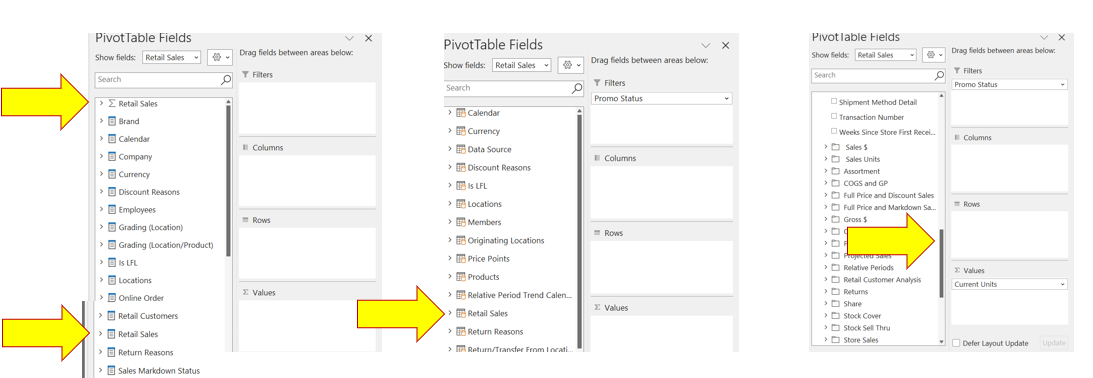
In the updated version, these folders are collapsed into one folder e.g. called Retail Sales with a new grid and cube icon.

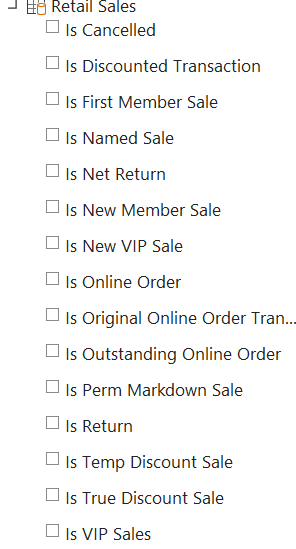
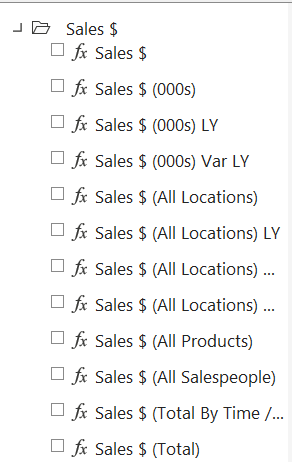
In the revised folder, the attributes are listed first such as Transaction Number and you will need to scroll down to see the list of measures organised in the same folders as they were before. Measures will have a fx prefix to denote that this is a fact or value not an attribute.
[Image Below: New interface - Attributes are listed first]
[Image Below: shows measures in folders with a 'fx' prefix]
Why has this changed?
This is a change delivered by Microsoft to align the interface between Microsoft Excel Pivots, Power Bi and other applications.
The trigger for this change was the recent update we have made to the version of SQL we are using. As part of our service, we are committed to keep our systems and applications up to date. This latest update from Microsoft does claim better performance as well.
Please note
No change has been made to your data or your reports.
Your reports and your portal will still run, refresh and display as they did.