![mousemat.png]](https://fundamentals.theretailscore.com/hs-fs/hubfs/mousemat.png?height=40&name=mousemat.png)
Expand | Collapse Pivot field
In Excel, attributes can be collapsed and expanded, allowing for hierarchical reporting.
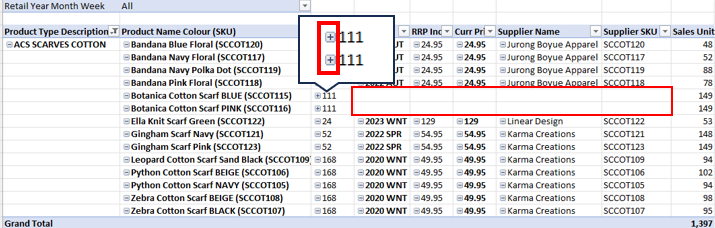
Sometime, a row can become collapsed unintentionally, causing any data represented after the collapsed field to show as blank. (e.g. see blank red box below)
You can see this is collapsed by the '+' symbol in front of the last field showing data, in this case the value of '111'.
The '+' represents the ability for this field to be expanded, whereas all other fields showing data show the '-' in this field representing that it is already expanded.
To fix:
- Right click into the field with rows needing to be expanded.
- Click [Expand/Collapse]
- Select [Expand] to expand a singular field
- Or select [Expand Entire Field] to expand all rows in the field

This will populate the field with the missing collapsed data:
