![mousemat.png]](https://fundamentals.theretailscore.com/hs-fs/hubfs/mousemat.png?height=40&name=mousemat.png)
About the General Ledger Module
The Retail Score integrates multiple data sources into a single, comprehensive and organised solution.
The GL Module is
- an optional add-on to your tRS Service for Profit & Loss and Balance Sheet Reporting
- Account Codes, Cost Centre Codes, Movements and Budgets
- Automatically, extracted from your ERP or Xero Application
- And integrated and organised into your tRS data warehouse for analysis and reporting
The key benefits of the module include:
- Automate your GL Reporting
- More flexible analysis of GL Information including multiple GL hierarchies
- Integrate Retail & Financial metrics for balanced scorecards
The Components
The General Ledger Module allows Finance teams to build automated Profit and Loss Statements, Balance Sheets and Trial Balances.
- Standard Measures include Opening Balance, Movements, Closing Balance or Credit Amount, Debit Amount, Transaction Amount and Budgets
- Standard Attributes include Cost Centre and Accounts
There are 8 main components to your General Ledger Reporting.
- ERP (eg/ AP21, NetSuite, Harmony etc): which is the source of your cost centre codes, account codes, opening balances, movement and budgets.
- Admin Portal: Which stores your reference files controlling your mappings, hierarchies, report views and calculations along with retail budgets, automated reporting and other functions
- Account Master File: defines how your account codes are argregated, grouped and organised into Hierarchies and Attributes in your data warehouse as well as the basis for financial calculations such as EBIDTA.
- Cost Centre Master File: defines how your cost centre codes are aggregated, grouped and organised into Hierarchies and Attributes in your data warehouse and therefore allowing you to apply these views to your financial calculations or GL reports such as your P&L.
- Report Views File (optional): defines specific report views to be available in your data warehouse where a report is defined as organised and sorted list of measures for a particular report view.
- PL Calculations Reference: contains the formula’s used to generate the PL calculations in your data warehouse using the available Account Codes and Cost Centre Codes.
- Data Warehouse: Is the database that organises and presents all this information so you can build and refresh reports.
- GL Refresh: A short cut on your desktop which will fire off a refresh of the GL data on demand.
Please Note: Due to the sensitive nature of this information, only nominated users will be able to access the GL tables in the data warehouse and your insights portal.
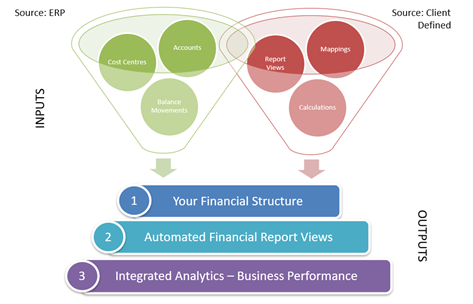
tRS imports your GL data from AP21, maps this with source files to create your financial structure, Report Views and Calculations:
Please refer to the additional articles in this category relating to maintaining your GL Module or requesting more information.