![mousemat.png]](https://fundamentals.theretailscore.com/hs-fs/hubfs/mousemat.png?height=40&name=mousemat.png)
Definition
Use this document for setting up user access to Power BI Desktop. Whilst it is possible to connect Power BI to your tRS cube, you will need your Power Bi consultant to support you with setting up your workspace to share with others. This will involve authentication procedures and licensing that is not supported by the tRS Helpdesk.
Pre requisite
Download and Install Power BI Desktop
https://powerbi.microsoft.com/en-us/get-started/
You must have your Pivot4Planners set up instruction guide together with your Server Name, Database Name User Name and Password
You must also have set up the Windows Credentials Manager as per the Pivot4Planners set up guide.
Only users who have installed Power BI Desktop and are registered and set up with access to Pivot4Planners will be able to view and interact with dashboards you share with them
Get Connected
Start Power BI Desktop
Click on GET DATA
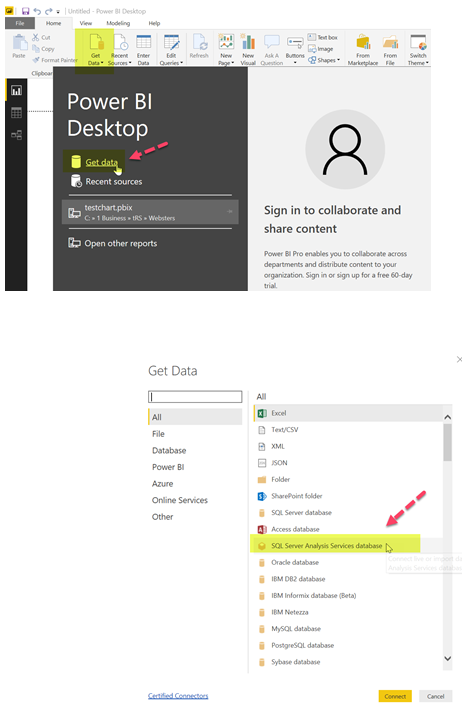
Select SQL Server Analysis Services Database
And select Connect
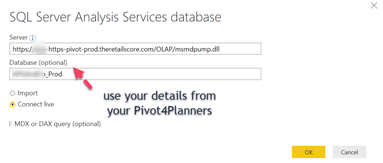
Paste the connection URL into the Server Field
https://[enter your business acronym]-https-pivot-prod.theretailscore.com/OLAP/msmdpump.dll
Enter the database name
[business name]_Prod
Connect Live option is selected then click OK and wait for the Data Fields window to appear (about 45 seconds)