![mousemat.png]](https://fundamentals.theretailscore.com/hs-fs/hubfs/mousemat.png?height=40&name=mousemat.png)
Background
TheRetailScore supports multiple LFL methodologies such as:
- Location Classification – where locations are hard-coded into a defined list of stores
- Dynamic Comparison – where sales for the time period selected are validated vs last year
- Is Open Flag – where stores by week are flagged as open with “1” and closed “0”
Over the last 5 years in discussions with +50 plus retailers there is one stand out methodology that is both simple to explain/understand and robust and flexible to apply and that is the “Is Open” Flag.
Methodology
The retailer maintains an excel workbook with all locations by year in rows (for the last 2 years) and the weeks 1-53 as columns. Each cell “store/week” is given a 1 and a 0 where 1 = Is Open or 0 = Is Closed. When calculating like for like back through time only store/weeks will be considered ‘LFL’ if they both contain a “1”.
This can easily be automated or manually controlled.
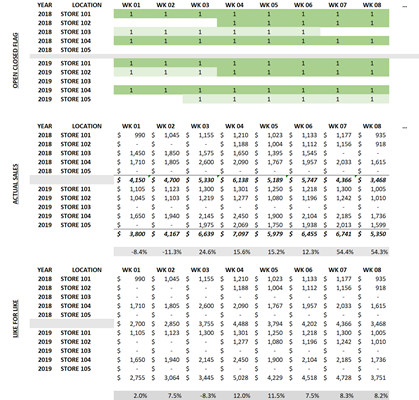
- YTD SALES TY $ 46,228
- YTD SALES LFL TY $ 31,517
- YTD SALES LY $ 39,088
- YTD SALES LFL LY $ 29,623
- YTD SALES V LY (%) 18.3%
- YTD SALES LFL V LY (%) 6.4%
Benefits of this approach
- Easy to explain as it only counts stores that were flagged as open by week this year vs last year
- Easy to maintain as it only requires a simple decision in Excel of 1 or 0
- Is accurate regardless of the time period, category (fast or slow moving goods or location type.
- Is flexible as retailers can easily “0” out weeks for a location closing down or refurbished that can bias results with unusual behavior.