![mousemat.png]](https://fundamentals.theretailscore.com/hs-fs/hubfs/mousemat.png?height=40&name=mousemat.png)
Sales Orders may need currency to display all relevant data.
As a default, the Sales Orders and Invoices are set up in the cube to require currency to view all the orders and invoices because they have not been currency modified.
This means that the exchange rate is not applied to convert all sales orders and invoices back to AUD, instead, currency is required to report all sales orders and invoices across their local currency.
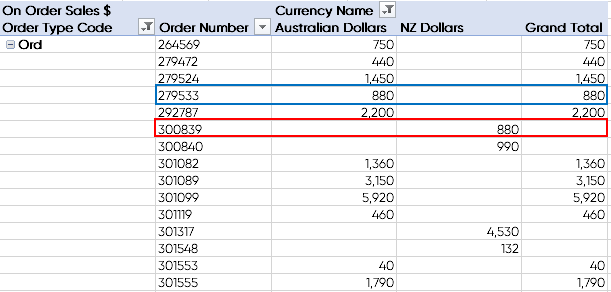
See below table: Please note that the Grand Total is AUD value only, as such foreign currencies do not show in the totals and won't show at all if you do not drop in the currency field.

In more detail:
blue - AUD example
red - foreign currency example
Currency Modified
You can opt to amend your cube so that Sales Orders and Invoices are currency modified.
This means that all foreign currency sales orders and invoices are converted to AUD using the exchange rate entered into AP21.
Therefore all orders will report at the converted to the AUD value. They will not require the currency field to be added to the pivot to report all data.
Currency can still be added to view foreign values in their local currency.
AUD will be a blend of local currency and converted foreign currency.
To view true local currency AUD, there are customer attributes to filter your data by.
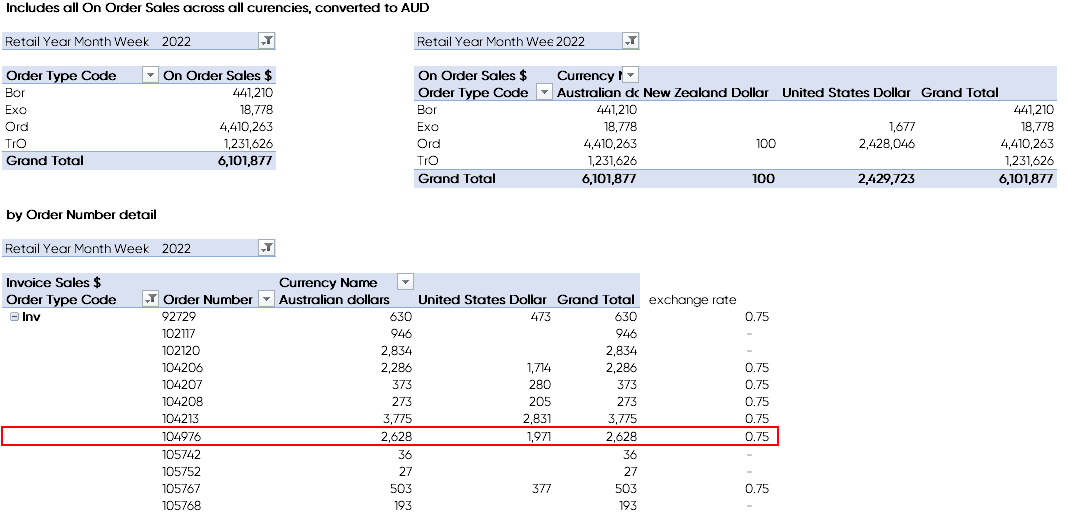
See below example:
The Detail level shows the unique order number in local currency and the converted AUD value
All values roll up to give a total invoiced (or on order) value converted to AUD.