![mousemat.png]](https://fundamentals.theretailscore.com/hs-fs/hubfs/mousemat.png?height=40&name=mousemat.png)
Budget Types and Capability
TRS can load up to 3 different budgets
These are commonly named:
- Budgets
- Forecasts
- Targets
Budget measures available:
All budgets can be loaded with 1 or more of the following measures:
- Sales $ / Invoice $
- GP $ (and therefore GP %)
- Units
Location, Product and Customer (Wholesale) Budgets:
Budgets can be loaded against:
- Location Code level in your tRS data warehouse (most popular)
- A Product level in your tRS data warehouse
- or a combination of location by product (will require more maintenance though)
- A Customer level in your tRS data warehouse
Contact support@theretailscore.com if your budget option is not listed in this article or if you need additional help organising and defining your budgets.
Other considerations
- From these uploaded measures, calculations can be added around GP%, Variance $ and Variance % to Actual.
- Click here to see the article on how to maintain your external upload files
-
- Budgets can be set using either Location or Originating Location as nominated by the client.
Budget Formats and Usability
There are two budget formats provided as standard to load budget data into your tRS data warehouse, a choice between these budget formats is made during implementation, these formats are;
• Weekly Budget + Daily Splits
• Daily Budget.
The below will cover the variance in format and benefits for each choice.
Weekly Budgets
- Weekly budgets are loaded by Retail Year and Retail Week for each Location and/or Product attribute
- The weekly budget number is then split into a daily number in a separate 'Daily Splits' file - see below for more information.
- These can be loaded for the full season or edited and loaded as required
- xx link to Weekly budget template
- example view of the template

Daily Splits (For Weekly Budgets)
- The daily splits file is an upload that splits the weekly sales budget to a daily number.
- This is loaded by Location and/or Product by Retail Year and Week.
- Each day is proportionately split to a decimal rounded to 3 decimal places only.
- The Week must total 1.000 rounded to only 3 decimal places.
- xx link to Daily Splits template
- example view of the template

Weekly Budget Pro's/Con's
Pro
• The weekly budget format allows for far fewer rows to be maintained as it is at a row-year level.
Con
• The weekly budget format required a daily split file.
• The phasing around holiday/event periods can be more complex to maintain as the splits are managed at a retail week level.
Daily Budget
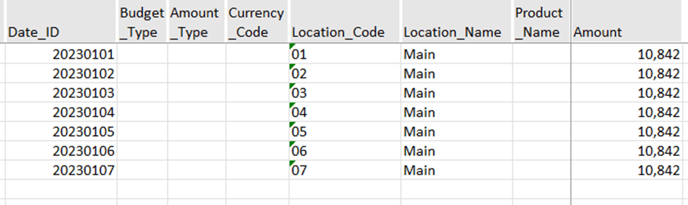
- Daily budgets are loaded by Retail Year, Week, and Date for each Location and/or Product
- These can be loaded for the full year/season or edited and loaded as required
- xx link to Daily budget template
- example view of the template:
Daily Budget Pro's/Con's
Pro
• The daily budget format allows for far greater control, allowing for flexible budgeting by date for holiday/event periods
• The budgets can be managed to a financial or retail calendar
• The budget can be managed to a Monthly/Weekly or Daily number (with some limitations)
Con
• The daily budget format requires date-level budgeting for best performance, which means managing up to 365 rows for a full year's budget by location/product
Limitation
• Whilst possible to budget at a monthly line (useful for wholesale budgeting + reducing the rows required to manage) it does come with a visual issue when reviewed in the portal's HQ dashboard.
Here we can see for "today-day" the wholesale budget amount is 0 - as the monthly budget is not linked to the filtered on day.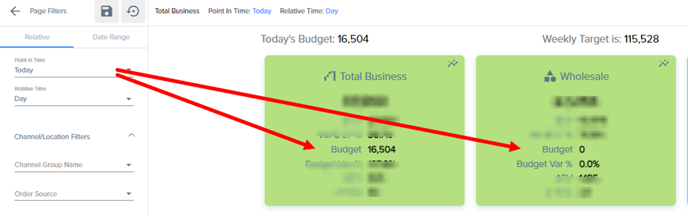
This causes issues when looking at daily reports through a wholesale lense.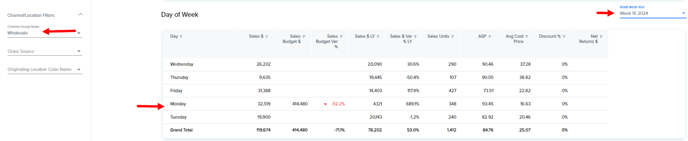
It does however have minimal impact on the wholesale dashboard which is generally reported at a monthly level