![mousemat.png]](https://fundamentals.theretailscore.com/hs-fs/hubfs/mousemat.png?height=40&name=mousemat.png)
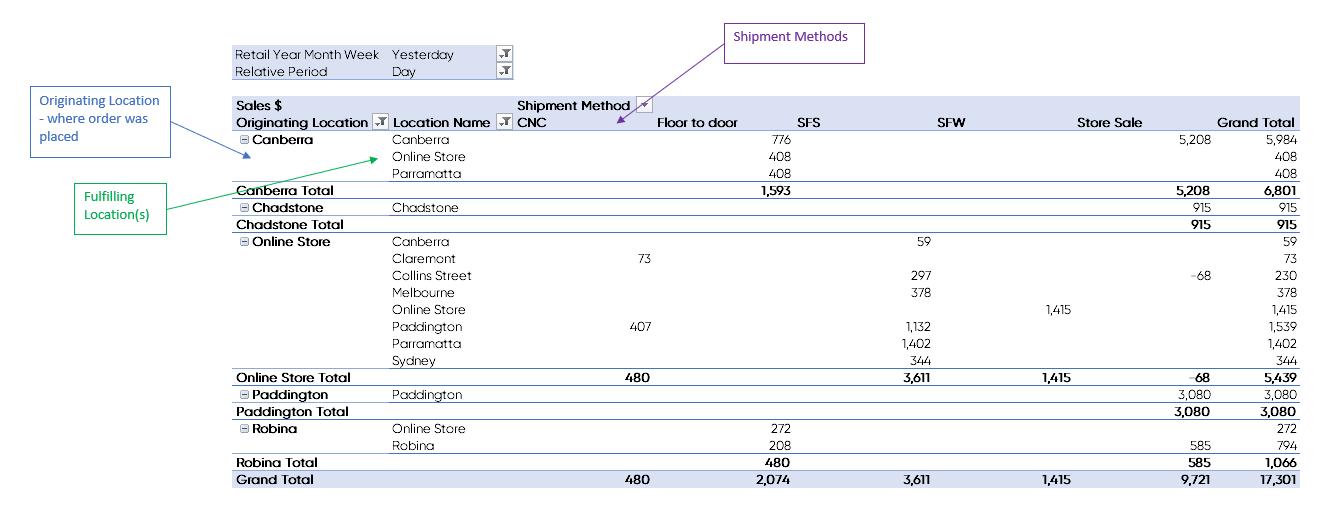
The Shipment Method is often used in conjunction with both Location and Originating Location and reports the method by which the store or warehouse Fulfilled the Sale.
The below table summaries the terms and their meaning:
|
Shipment Method Glossary |
Definition |
|
|
CNC |
Click and Collect |
bought Online and collected from store that is not online or online returns. (no carrier involved) |
|
F2D |
Floor to door |
bought in store and shipped somewhere else (either from another store or the originating store) |
|
SFS |
Ship from store |
bought Online and shipped against store that is not online or online returns. |
|
SFW |
Ship from warehouse |
bought Online and shipped from Online warehouse |
|
Store Sale |
Store Sale |
bought and fulfilled from same store |
The below pivot table example shows Shipment Method reporting against both Location and Originating Location:
FAQ
Q. How do you determine SFS v CNC?
A. To work out whether an order is SFS or CNC we look in the Web Sales Transactions within the ERP. These are transactions generated when a web sale is despatched.
Q. Why do I have Floor to Door orders with the same Location and Originating Location?
A. The data is extracted from Web sales in the ERP, this includes both Online orders and Customer orders.
All these orders have an order # that is prefixed with an ‘O’ and are automatically classified as ‘floor to door’ unless it originated from the online store. This can include both customer orders, not just online orders.
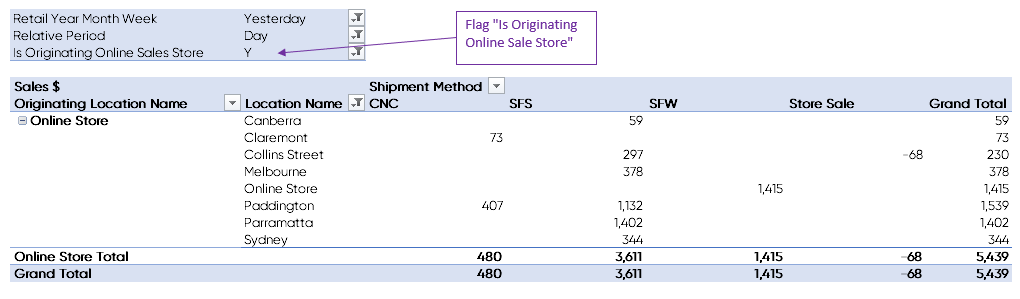
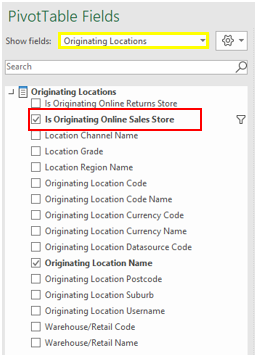
To filter on just online orders or to exclude online orders, use the “Is Originating Online Sales Store’ under the Originating Location table.
See below pivot example using the flag "Is Originating Online Sale Store" to filter sales to include (or exclude) sales orders that originated online.
This field can be found under the Originating Locations attributes:
xx click link to view difference between Location and Originating Location.