![mousemat.png]](https://fundamentals.theretailscore.com/hs-fs/hubfs/mousemat.png?height=40&name=mousemat.png)
About
tRS supports multiple budgets such as Wholesale Budgets, Forecast and Targets across multiple measures such as Invoice Sales $ and GP$. This article explains how to set up your budgets using the correct template to get them loaded into your tRS Service.
Weekly Wholesale Budget Template
Your weekly wholesale budget template must be formatted and maintained in a specific structure to be uploaded into your tRS service and this is best done in MS Excel.
When preparing your budget template, the final template with look like this:

And will have the following column headings.
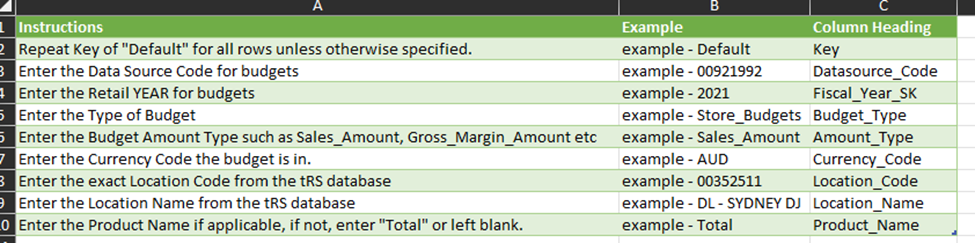
Note -
For Wholesale budgeting, we will replace Columns G-I with Customer Group Hierarchies.
As such, instead of Location Code|Name, replace with how we wish to budget our Invoice Sales $.
Most of the time it is via Customer Group Code and Customer Group Name, If we wish to break down the Invoice Sales $ amount further, we can then use the Product Column(I) to concatenate further Customer/Product/Shipment method attributes.