![mousemat.png]](https://fundamentals.theretailscore.com/hs-fs/hubfs/mousemat.png?height=40&name=mousemat.png)
Sales
There are 3 key ways to view Sales values split out by Full Price and Markdown.
1. Sales Markdown Status Table
2. Full Price Sales and Markdown Sales Measures found under the Sales Table
3. Product Markdown Status (does not work for history - see more below)
Stock
Stock values can only be viewed using the Full Price and Markdown Stock measures found under the Stock table
Stock can not be view alongside the sales markdown status table as this is limited to sales only and the stock values will repeat.
Definition
Full Price
An item is considered Full Price if it has not had a Permanent Markdown applied to the product.
Temporary promotions and Markdowns with an end date are not considered permanent markdowns and as such, they will report against Full Price Status
Markdown
An item that has had a permanent markdown applied against the product will report as a Markdown
Sales Markdown Status
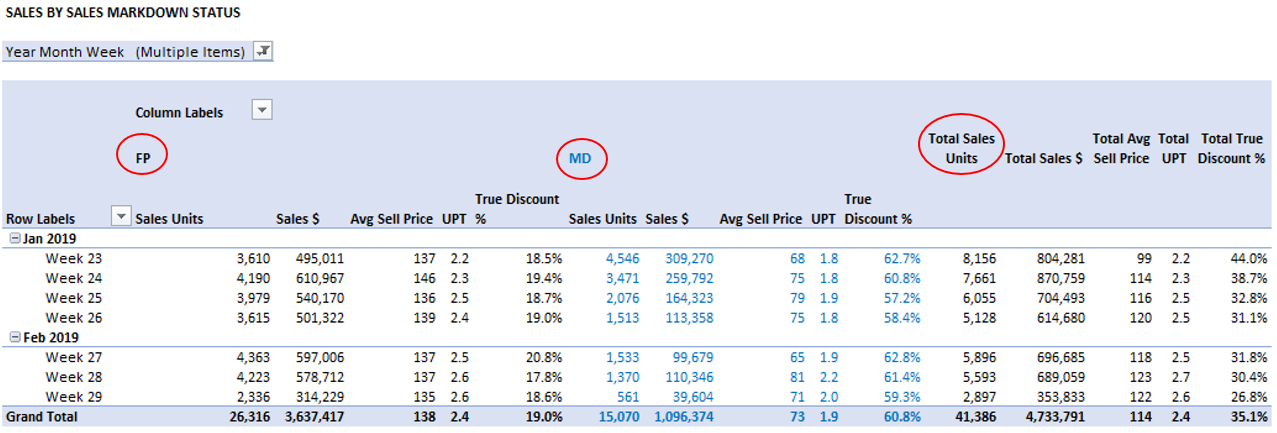
Sales Markdown Status reports the Full Price (FP) and Markdown (MD) Sales at the transaction level. As such, the transaction carries with it the details of the status of the sale at the time of the sale.
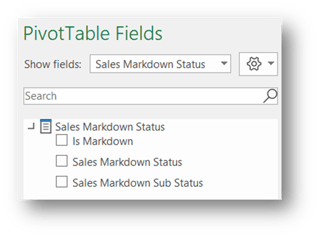
Depending on your ERP, it may report only FP v MD eg.

Or
It may split the status into a sub status.
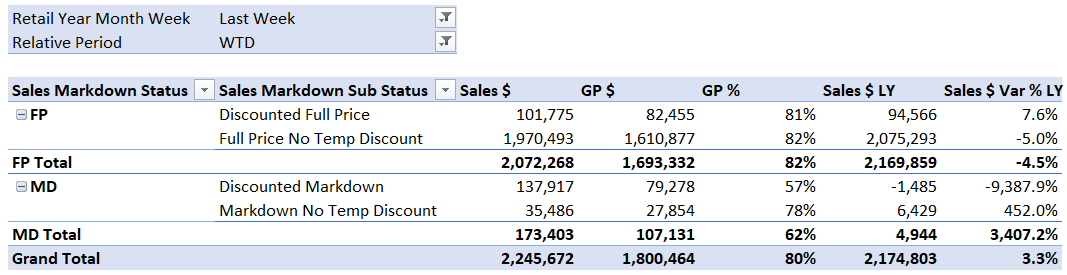
This will differentiate between:
- Full Price or Markdown Sale that has not had any promotional activity applied
- Full Price or Markdown Sale that may have had a promotion applied at the time of the sale. eg take a further X% applied to the sale at the POS.
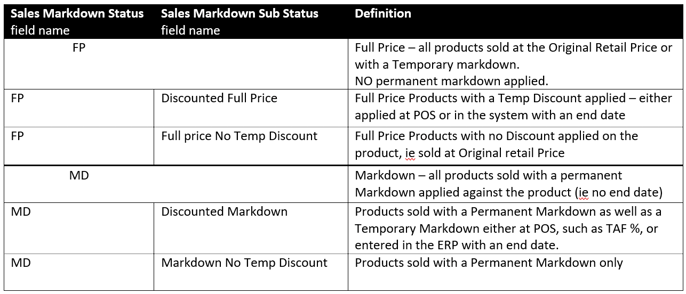
Definitions in the below table:
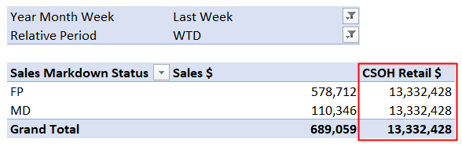
This is a Sales measure only and does not report against Stock.
If you were to add a stock measure to this table, the stock data will repeat.
The advantage of using the Sales Markdown Status is that you can then use all Sales Measures to report against the status attribute.
See below pivot as an example where I've used other sales measures such as ASP and UPT, against each status.
Full Price and Markdown Stock and Sales Measures
These can be found in a folder called "Full Price and Markdown" under the each of the Sales and Stock tables.
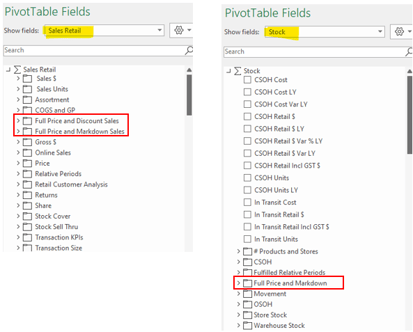
Full Price and Discount Sales within the Sales Module provides the same Sales values by Full Price and Markdown as returned by the Sales Markdown Status report, however it allows the user to be more dynamic with their reporting.
- Can use FP and MD stock and sales measures in the one report
- Ability to include FP and MD data in a report with other metrics unrelated to FP and MD
Full Price and Markdown Measures enable you to report on FP and MD Stock and Sales in the one report.
Product Markdown Status
The Markdown Status is an attribute found under the Product Table. As with all product attributes, it can only report against the status of the product @Today, it can not report historically.
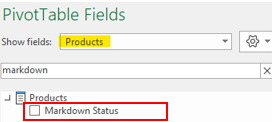
Product Markdown status attribute is a useful measure when reporting at a product level and you are not comparing that item to LY for example.