![mousemat.png]](https://fundamentals.theretailscore.com/hs-fs/hubfs/mousemat.png?height=40&name=mousemat.png)
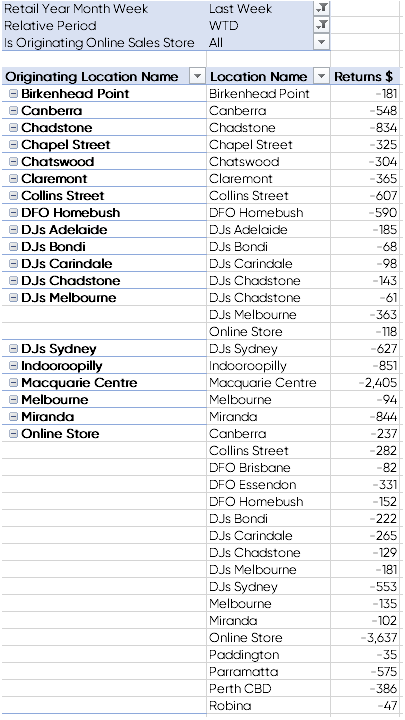
Follow the below steps to view all Returns against their Originating Location, including Online Sales returned to a Store.
Open a pivot and bring in the following fields:
- Originating Location (location where original sale was placed)
- Location (in this case, where the return transaction was fulfilled)
- Return $ or Net Return $ Measures
By doing so, you have visibility of where the transaction originated (Originating Location), where the return transaction was completed (Location), and the value of the Return $ or Net Return $.
To view returns against the original location, the return must be transacted against the original docket number.
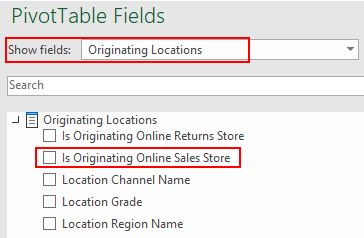
To filter your result to only view Online sales which have been returned, bring in the field called:
'Is Originating Online Sale Store'
Found under 'Originating Locations' in the show fields drop down box.
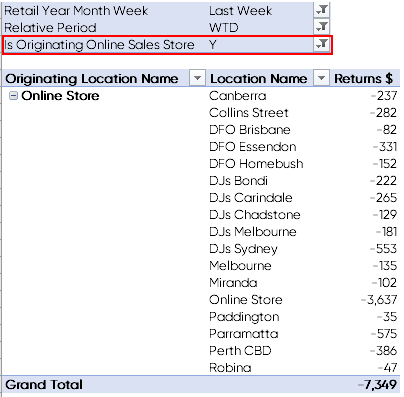
By selecting 'Y', for yes 'Is Originating Online Sales Store', you will filter your data to only view Sales which Originated Online, together with the Location where the item was returned - this could be a Bricks and Mortar (B&M) Store or returned against the Online location.
Again, it will only report as such if the return is completed against the original docket number.
Please also review Returns Module to view original and return transaction and payment details
Linking Returns to Original Transaction and Payment Detail